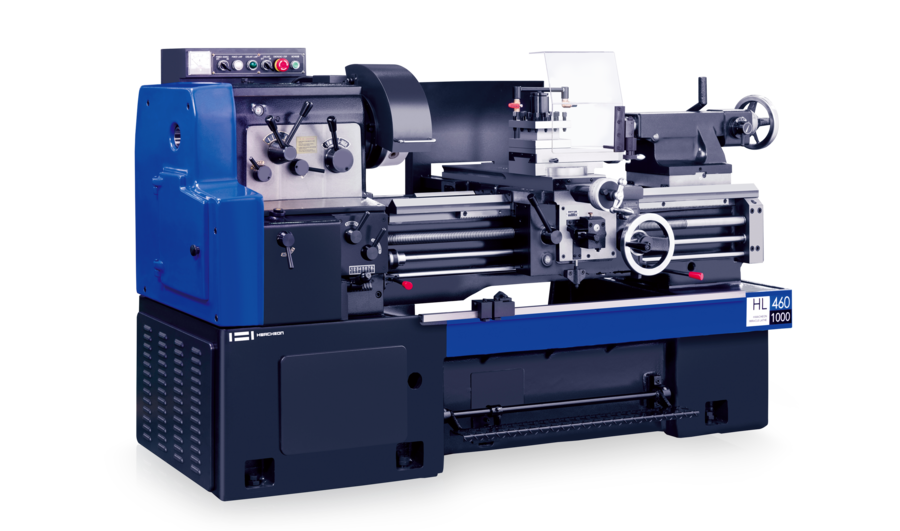
HL-460

Hwacheon HL Series high-precision conventional (manual) lathe with Ø460 mm swing over bed and 1,000 / 1,500 mm between-centre lengths for external turning, facing, boring and tapping.

Spindle Nose
-
A1-6" or D1-6"
Max Speed
-
Ø52 mm
Through Hole
-
920 - 1,420 mm
Max Bar Size
-
5.5 kW (7.5 HP)
No items found.

 Model Specification Table

WEBFLOW PRODUCT IMPORT - README
Site: 69dc8a7bf198c37ca722c7db
WHAT THIS DOES
Fill product data in these tabs, then push it to Webflow from the "Webflow Import" menu. References, options, images and PDFs are all handled for you.
ONE-TIME SETUP
1. Extensions > Apps Script holds the code. If the menu is missing, reload the sheet.
2. Webflow Import > Set API token -> paste your Webflow token (CMS read+write). Authorize when asked.
3. Webflow Import > Refresh dropdowns from Webflow -> fills every reference/option column with live choices.
HOW TO FILL ROWS
- You only fill Name and the content columns. Never fill slug or _webflow_id (grey) - the script creates and manages them.
- Reference columns (Brand, Product Category, etc.): pick the NAME from the dropdown.
- Multi-value columns (Application Examples, Software Packages, Automation, Big Type, Service Support): click the cell, then Webflow Import > Pick multiple for selected cell -> check items -> Apply.
- Hero Highlights: click the cell, then Webflow Import > Edit highlights list -> one line per bullet -> Apply.
- Option columns (Orientation, Spec Group, FAQ tags): pick from the dropdown.
- Best Seller: TRUE/FALSE or Yes/No.
- Images / Brochure PDF: paste a PUBLIC link. Dropbox links and Webflow CDN links work and auto-convert. Google Drive is unreliable - avoid it.
- Numbers: plain numbers (commas are ok).
PUSHING TO WEBFLOW
- Sync ALL tabs (in order) -> pushes every tab in dependency order.
- Sync ACTIVE tab only -> pushes just the open tab.
- Sync SELECTED row(s) only -> select the row(s) you changed, pushes only those.
- New items are created as DRAFTS. Publish in Webflow when ready (or set PUBLISH_AFTER_SYNC = true in the code to auto-publish what each sync touches).
NO DUPLICATES
The slug is built from the Name and used to match existing items: found = update, not found = create. Re-running is always safe. Do not rename a product if you want it to keep updating the same item.
FORMATTING
Webflow Import > Format / beautify tabs -> styles headers, sets column widths, wraps long text, mutes the slug/_webflow_id columns.
PULL FROM WEBFLOW
Webflow Import > Pull existing items into ACTIVE tab -> fills the open tab with what is already in that Webflow collection (names, options, image URLs) so you can edit in

Complete Machining Capabilities

Achieve precision and efficiency with full multi-axis machining in a single setup.

Annual Maintenance Contract & Preventive Maintenance
Breakdown Maintenance
Spare Parts & Accessories
Machine Calibration
Retrofit Solutions
Machine Relocation, Installation & Commissioning
Machine Reconditioning
Workholding, Tooling, Robotics & Automation

Service & Engineering Support

Beyond the machine—comprehensive support throughout your ownership journey

Preventive Maintenance

Frequent Calibration
Add Ons / Contracts

Operator Training

Important things to know

See why 70% of Tier-1 Customers are Loyal to us

What do EuroGulf provide?
Do you support multiple CNC brands?
Do you integrate automation?
Why choose a single partner?

Find the Right Machine for Every Manufacturing Challenge

Explore a comprehensive portfolio of CNC machine tools, automation systems, and industrial solutions engineered for precision, productivity, and long-term performance.